Darb App UAE – Complete Guide 2026 (Registration, Toll Gates, Recharge, Fine Check & Features)
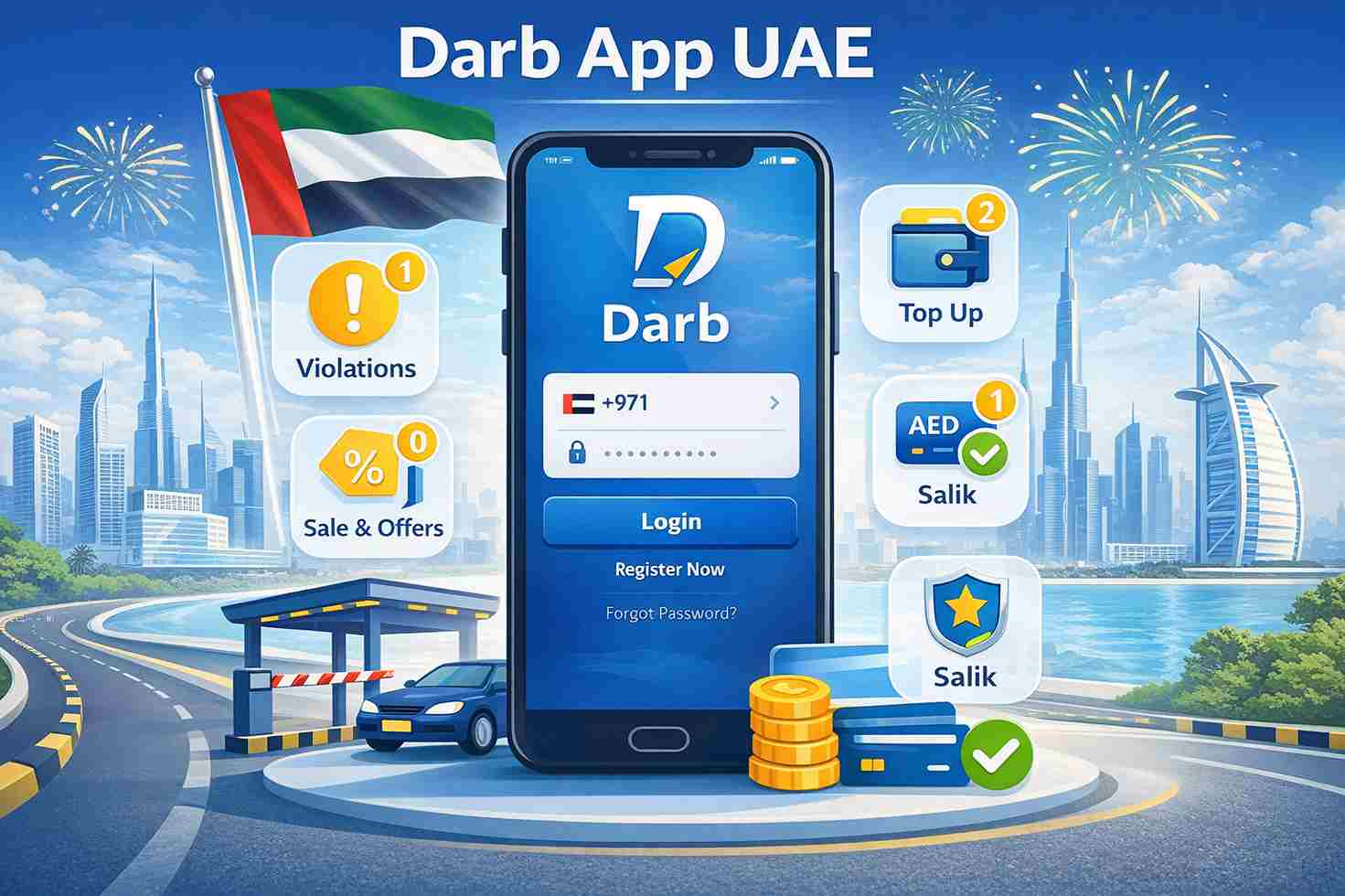
The Darb App is the official smart mobility application used in Abu Dhabi for managing toll gate services, vehicle accounts, parking payments, and transportation-related services.
Developed by the Integrated Transport Centre (ITC), now operating under the Integrated Transport Centre (Abu Dhabi Mobility), the app allows motorists to handle most toll-related services directly from their smartphones.
If you regularly drive in Abu Dhabi, the Darb App is one of the most important applications you should have installed.
This guide covers everything you need to know about the Darb App, including registration, recharge methods, toll payments, fines, vehicle management, and frequently asked questions.
Quick Facts About Darb App
Official Service: Abu Dhabi Toll Gate System
Authority: Abu Dhabi Mobility (Integrated Transport Centre)
Platform: Android and iPhone
Main Purpose: Toll gate and transportation services
Services Available: Registration, recharge, fine payments, vehicle management, parking services
Coverage: Abu Dhabi Emirate
What Is the Darb App?
The Darb App is the official mobile platform that allows drivers to manage their Abu Dhabi toll gate accounts digitally.
Instead of visiting service centers, users can:
Register vehicles
Pay toll charges
Recharge accounts
View transactions
Check fines
Manage multiple vehicles
Update account details
The app simplifies transportation services and reduces paperwork.
What Is the Abu Dhabi Toll Gate System?
Abu Dhabi introduced an electronic toll gate system to manage traffic flow and reduce congestion.
Vehicles passing through designated toll gates are automatically charged.
The system works using vehicle plate recognition technology.
No physical toll booths exist.
No stopping is required.
The charge is deducted electronically from the user’s Darb account.
Abu Dhabi Toll Gate Locations
The Darb toll system currently operates at major bridges entering Abu Dhabi Island.
Sheikh Zayed Bridge
One of Abu Dhabi’s busiest entry points.
Sheikh Khalifa Bridge
Connects key areas of Abu Dhabi.
Al Maqtaa Bridge
Popular route for daily commuters.
Mussafah Bridge
Important access route for residents and businesses.
Vehicles crossing these bridges during chargeable hours are automatically billed.
Darb Toll Charges
Standard toll fee:
AED 4 per crossing
Maximum daily charge:
AED 16 per vehicle
Maximum monthly charge:
AED 200 for the first vehicle
Special conditions and exemptions may apply to eligible vehicles.
Toll Charging Hours
Charges generally apply during peak periods.
Morning Peak
7:00 AM to 9:00 AM
Evening Peak
5:00 PM to 7:00 PM
Weekends and public holidays are generally exempt from toll charges.
Always check the latest Abu Dhabi Mobility announcements for updates.
How to Download the Darb App
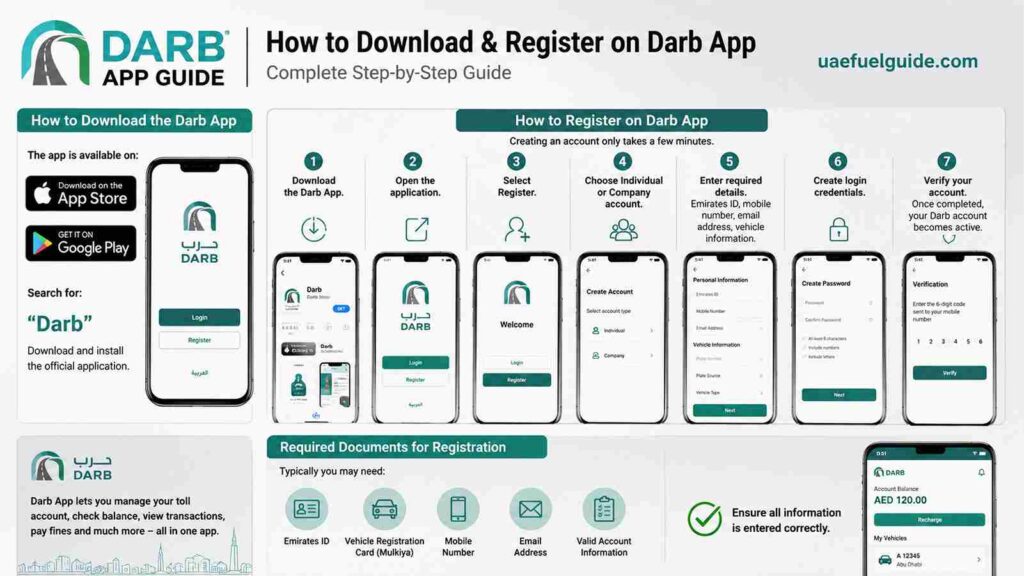
The app is available on:
Apple App Store
Google Play Store
Search for:
“Darb”
Download and install the official application.
How to Register on Darb App
Creating an account only takes a few minutes.
Step 1
Download the Darb App.
Step 2
Open the application.
Step 3
Select Register.
Step 4
Choose Individual or Company account.
Step 5
Enter:
Emirates ID details
Mobile number
Email address
Vehicle information
Step 6
Create login credentials.
Step 7
Verify your account.
Once completed, your Darb account becomes active.
Required Documents for Registration
Typically you may need:
Emirates ID
Vehicle registration card (Mulkiya)
Mobile number
Email address
Valid account information
Ensure all information is entered correctly.
How to Add a Vehicle
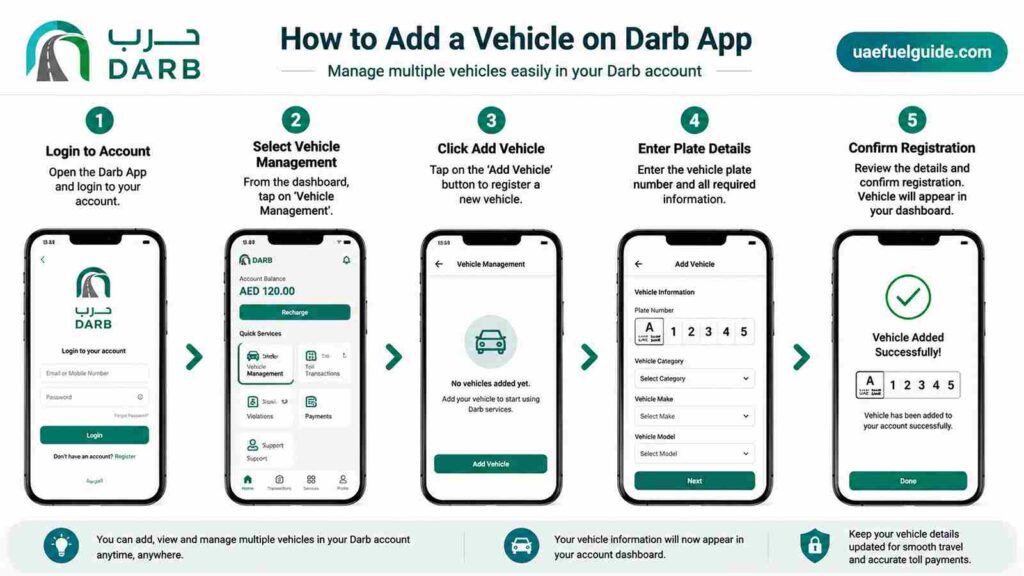
The Darb App allows users to manage multiple vehicles.
Steps
Login to account
Select Vehicle Management
Click Add Vehicle
Enter plate details
Confirm registration
Vehicle information will appear in your account dashboard.
How to Recharge Darb Account
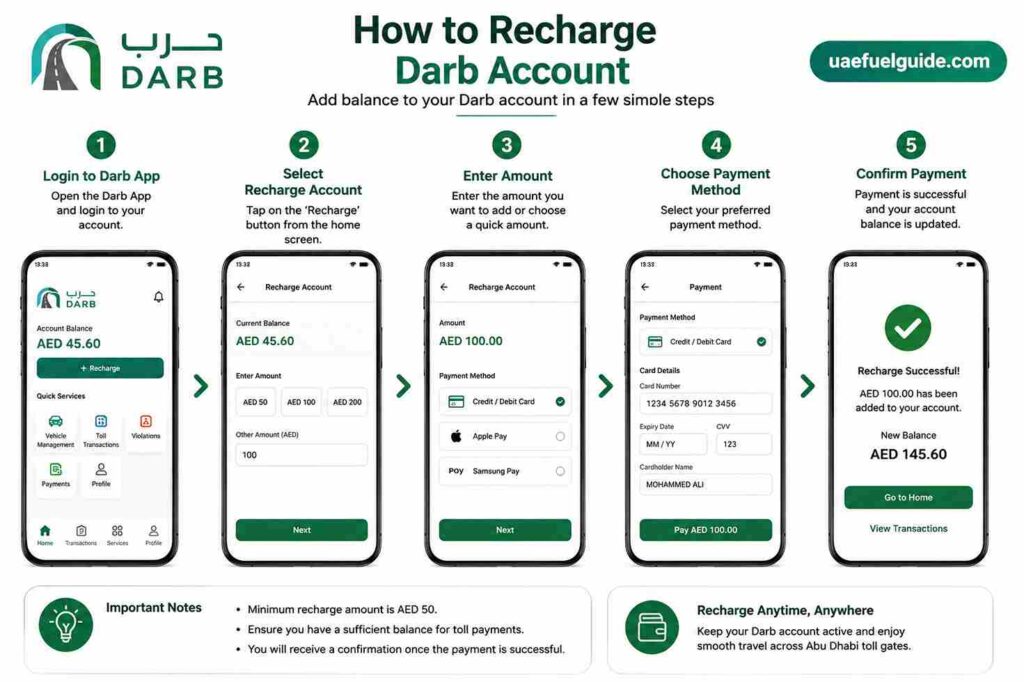
Maintaining account balance is important to avoid violations.
Steps to Recharge
Login to Darb App
Select Recharge Account
Enter amount
Choose payment method
Confirm payment
Balance updates immediately in most cases.
Darb Recharge Methods
Users can recharge through:
Credit card
Debit card
Online payment channels
Official Darb portal
Mobile application
Electronic payments are the most convenient option.
Minimum Recharge Amount
Recharge requirements may vary depending on system updates.
Most users simply add sufficient balance to cover future toll crossings.
How to Check Darb Balance
Checking account balance is simple.
Steps
Open Darb App
Login
View Dashboard
Current balance appears on the main screen
Monitoring balance helps avoid penalties.
How to Check Toll Transactions
The application provides complete transaction history.
Users can view:
Date
Time
Bridge crossed
Amount charged
Account deductions
This feature helps track toll expenses.
Darb Fine Check
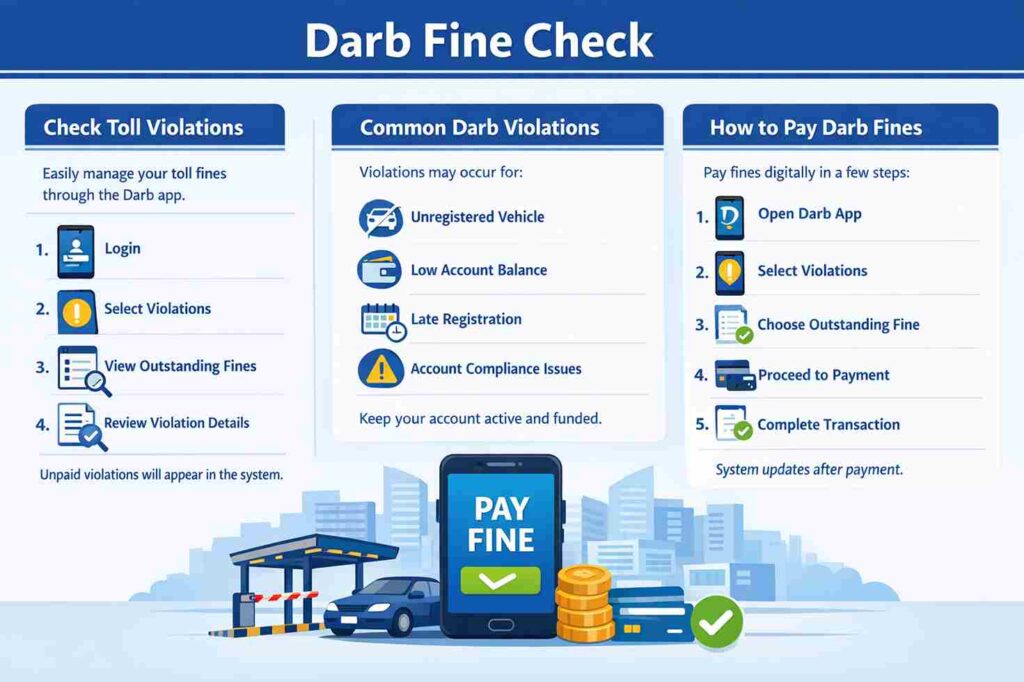
Drivers can check toll-related violations through the app.
Steps
Login
Select Violations
View outstanding fines
Review violation details
Any unpaid violations will appear in the system.
Common Darb Violations
Violations may occur for:
Unregistered vehicle
Insufficient account balance
Late registration
Failure to maintain account compliance
Always keep your account active and funded.
How to Pay Darb Fines
Fine payments can be completed digitally.
Steps
Open Darb App
Select Violations
Choose outstanding fine
Proceed to payment
Complete transaction
The system updates after successful payment.
Vehicle Management Features
The app offers extensive vehicle controls.
Users can:
Add vehicles
Remove vehicles
Update vehicle information
Transfer ownership details
Monitor vehicle activity
Everything can be managed from one account.
Notifications and Alerts
The Darb App sends notifications for:
Low balance alerts
Successful payments
Violation updates
Account changes
Vehicle activity
These alerts help users stay informed.
Darb Parking Services
The application may also provide access to selected transportation and parking services.
Depending on service availability, users can manage parking-related activities through connected Abu Dhabi Mobility platforms.
Benefits of Using Darb App
Fast Digital Access
Most services can be completed in minutes.
No Service Center Visits
Everything is available online.
Real-Time Updates
Account activity updates instantly.
Easy Fine Management
Drivers can check and pay violations quickly.
Secure Payments
Integrated payment systems provide secure transactions.
Common Problems and Solutions
Account Not Showing Balance
Refresh application or log out and log back in.
Vehicle Not Appearing
Verify plate information and registration details.
Payment Failed
Check card validity and available balance.
Login Issues
Use password reset or contact support.
Darb Customer Support
Users can contact Abu Dhabi Mobility support for:
Account issues
Vehicle registration problems
Payment concerns
Violation inquiries
Technical support
Support services are available through official customer service channels.
Tips for Using Darb App
Keep account balance available
Enable app notifications
Check transactions regularly
Update vehicle details immediately
Monitor toll deductions frequently
These practices help avoid fines and service interruptions.
Why Darb App Is Important for Abu Dhabi Drivers
Thousands of drivers cross Abu Dhabi toll gates every day.
Without a properly managed Darb account, motorists may face:
Violations
Additional fees
Account restrictions
Delayed payments
The application makes toll management simple and convenient.
Future of Darb Services
Abu Dhabi continues expanding smart transportation services.
Future enhancements may include:
Additional digital services
Enhanced payment options
Improved vehicle management tools
Smart mobility integrations
Advanced traffic management features
The Darb platform remains a key part of Abu Dhabi’s smart city transportation strategy.
Conclusion
The Darb App is an essential tool for anyone driving in Abu Dhabi. It allows users to register vehicles, manage toll accounts, recharge balances, check fines, monitor transactions, and access transportation services from a single platform.
By keeping your account active and maintaining sufficient balance, you can travel through Abu Dhabi toll gates smoothly while avoiding violations and penalties.
Frequently Asked Questions
What is the Darb App?
The Darb App is Abu Dhabi’s official toll gate and transportation services application.
Is Darb App free to download?
Yes, the application can be downloaded free of charge.
How much is the Abu Dhabi toll fee?
The standard toll charge is AED 4 per crossing during chargeable hours.
Can I recharge my Darb account online?
Yes, account recharge can be completed through the app.
How do I check Darb fines?
Login to the app and open the Violations section.
Can I add multiple vehicles?
Yes, multiple vehicles can be managed under one account.
Do tourists need Darb registration?
Visitors driving vehicles in Abu Dhabi should ensure compliance with toll registration requirements.
What happens if my balance reaches zero?
Insufficient balance may result in violations and penalties if toll charges cannot be deducted.